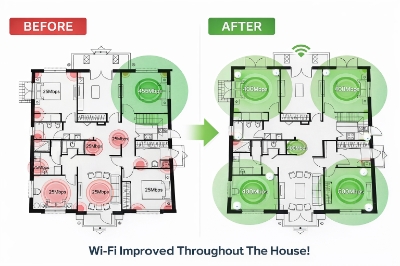
Slow Wi-Fi is easy to blame on the provider, but the real issue is often inside the property. In many cases, better placement, proper testing, and a smarter setup can improve speed, coverage, and reliability more than simply upgrading the plan.
Slow Wi-Fi does not always mean a slow internet service
When the internet feels slow at home or in the office, the first instinct is usually to blame the plan. Sometimes that is fair. But just as often, the issue has nothing to do with the provider and everything to do with how the network is set up inside the building.
Poor access-point placement, interference, weak coverage between rooms, and the lack of proper wired backhaul can all drag performance down. In those cases, paying for a faster plan may not solve much at all. The real issue is not the service coming in, but how that connection is being distributed across the space. That is the kind of problem addressed through Wi-Fi Dead Spots & Speed Fixes.
A Melbourne case that reflects a common problem
The original source mentioned a Melbourne client whose connection improved significantly after the Wi-Fi setup was corrected. The wording was promotional, but the situation itself is familiar. A connection can feel unreliable, patchy, and frustrating even when the internet service is capable of much better performance.
That is often what happens when the network has weak spots built into it. One room may perform well while another struggles. Speeds may look acceptable near the router but fall away in bedrooms, rear rooms, upstairs spaces, or work areas. In practice, that creates the impression of a poor internet service when the real problem is inconsistent internal coverage.
What usually causes patchy or unreliable Wi-Fi?
Wi-Fi problems rarely come from one single fault. More often, they build up from a combination of smaller issues that make the whole setup feel unstable. Common examples include:
poor router or access-point placement
too much distance between devices and the signal source
interference from walls, building materials, or nearby electronics
wireless links being used where Ethernet backhaul would be more reliable
inconsistent coverage between different parts of the property
These problems are especially common in larger homes, multi-room layouts, and workplaces where the network has grown over time without a clear plan behind it.
Why room-by-room testing matters
A single speed test does not tell the full story. A network might look fine in the lounge room and still perform badly almost everywhere else. That is why room-by-room testing matters. It shows what day-to-day use actually feels like across the property, rather than relying on one result taken in the best possible spot.
That kind of testing also makes troubleshooting far more precise. It becomes easier to tell whether the issue is poor placement, weak coverage, or the need for additional hardware.
Why placement and backhaul make such a difference
People tend to focus on equipment when they think about Wi-Fi problems. They look at the brand, the advertised speed, or the age of the hardware. Those things matter, but placement and structure matter just as much.
An access point can only do so much if it is installed in the wrong place or forced to work around weak network design. A well-placed unit supported by proper cabling will usually outperform a more expensive device that has been installed badly. That is why solving Wi-Fi issues often involves more than swapping out equipment. It is just as much about layout, positioning, and how the whole setup works together.
Signs the issue is bigger than a quick router reset
Some signs suggest the problem is more than a temporary glitch:
speeds are good in one room and poor elsewhere
video calls and streaming drop out regularly
some parts of the property have weak or inconsistent signal
changing internet plans has not improved performance
the connection feels uneven from room to room
When those patterns keep showing up, the issue is usually structural. It points to a setup problem rather than a simple service problem.
A practical takeaway
The main takeaway is straightforward: slow Wi-Fi is not always the provider’s fault. Quite often, the real issue sits inside the property itself, whether that means poor placement, dead zones, unstable coverage, or missing wired support between access points.
For homes and businesses dealing with patchy performance, the smarter first step is often to look closely at how the network is working across the space. Better testing, better placement, and a more thoughtful setup can make a much bigger difference than people expect.