 Irrespective of where you are working, you might have comes across label printers given the several benefits and applications it has. Not only are they useful when it comes to labelling or identifying products, but they can help you better manage and organise products as well.
That said, there are quite a few label printers you can find in the industry at this point. If you are new to this market, it can be quite confusing without proper assistance or guidance. Each printer has its own set of pros and cons, and understanding the features is the first step to making sure you use it efficiently.
Fortunately, this blog explains the few main features you should look out for when buying a label printer, making your decision a lot easier. Keep reading to learn what considerations can help you find the right product for your business.
- Label Life and Size Necessities:
Every business has different requirements when it comes to the width of the label and how long it has to last. However, if you have an idea of what your company requires, choose one that can print the necessary size. For instance, the majority of the popular printers, like Bixolon SLP-dx420, can print up to 104 mm wide labels.
Another thing that is of utmost importance is what technology you want, direct thermal or thermal transfer. Both these technologies determine how long your label will last when exposed to unfavourable environmental conditions. Understanding the difference and characteristic features of each can help you make a better decision.
- Printer Size and Speed:
In addition to the last point, you should also pay attention to the volume of prints you make in a single day and if you require portability. This will further decide the size of the printer you buy and what kind of printing speeds you should focus on.
While some printers like Zebra GK420T are made for high volume output, others are better off with smaller numbers. If you are printing high volumes of labels every day, you should always choose a printer with higher printing speeds. This way, your company’s productivity will not be hampered, and you will not have to slow down production.
- Printer Resolution:
Dpi or dots per inch is the unit used to decipher the printing resolution. If your business usually prints labels for products for retail purchase, you should invest in a model that provides higher resolutions. This is mainly because most retail products require a barcode, and barcodes require clarity to be scanned properly.
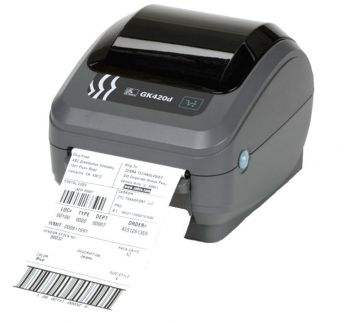
Traditional printers like the Zebra GK420D offer 203 Dpi, which is great for numbers, text, and codes. If you are using a printer strictly for low-resolution images or barcodes, this will do just fine. That being said, there are several other models that provide higher DPis ranging from 300 to 600.
This allows more information to be squeezed into a limited space and improves the ability to scan the barcodes. However, these products are much more expensive than the conventional models. Such investments are only required if you are printing 2D barcodes.
In Conclusion
To sum this article up, buying label printers with the necessary guidance can be quite overwhelming, especially when you consider the myriad of options present. However, the process is a lot easier with the points mentioned above, and you will surely find the best product.
Choosing the correct outlet for your purchase is also very important. With some of the best reviews in the industry, Aussie POS should be your choice. Here you will find all kinds of options and surely be able to decide which printer satisfies your company’s requirements the best.